← Part 3 · Part 4 · Part 5 → · Index
Part 4 — Virtual Faders
Goal: the viewer sees that every function of the X2 Wave Flame — angle, speed, ignition, valve open time, program select and arm — is under their control from the virtual faders, understands the six-channel DMX footprint behind that, and can also use faders as cue playbacks with flash keys, the Bank Master, macros, the virtual rear panel, the armed-state readout and the DMX monitor.
Runtime: 8–9 minutes.
You need: the studio in Virtual Faders mode, default layout. In Bank & Mapping Controls (right column, bottom), tick Fader playback. Open the Bank Master and Macros bars in the main column. Optional: the Virtual Faders panel benefits from a wider column — in Customize Workspace, drag it into the main column or Float it.
Images: images/p4-faders.png, images/p4-fader-settings.png, images/p4-stage-tilt.png, images/p4-bank.png, images/p4-master-macros.png, images/p4-rear-arm.png, images/p4-arm-direction.png, images/p4-monitor.png.
The X2's six channels (say this once, show it on the Build Sheet)
| CH | Function | Values (from the Explo X2 Fixture Build Sheet in Export For Vista 3) |
|---|---|---|
| 1 | Angle | 0–255 = −105° … +105°; 128 = 0° (straight up) |
| 2 | Speed | Movement speed of the head |
| 3 | Ignition | Fires on a rising edge into 254–255; must drop below 254 before it can fire again |
| 4 | Open Time | Valve time for a direct flame; 0 = gated (held while CH3 is high, up to 8 s), 1–254 = hundredths of a second, 255 = 2.5 s |
| 5 | Program | 0–2 = direct flame; 3–226 = internal sequences 001–088 |
| 6 | Arm | 50–200 = armed; anything else = safe / test |
4.1 The fader strip
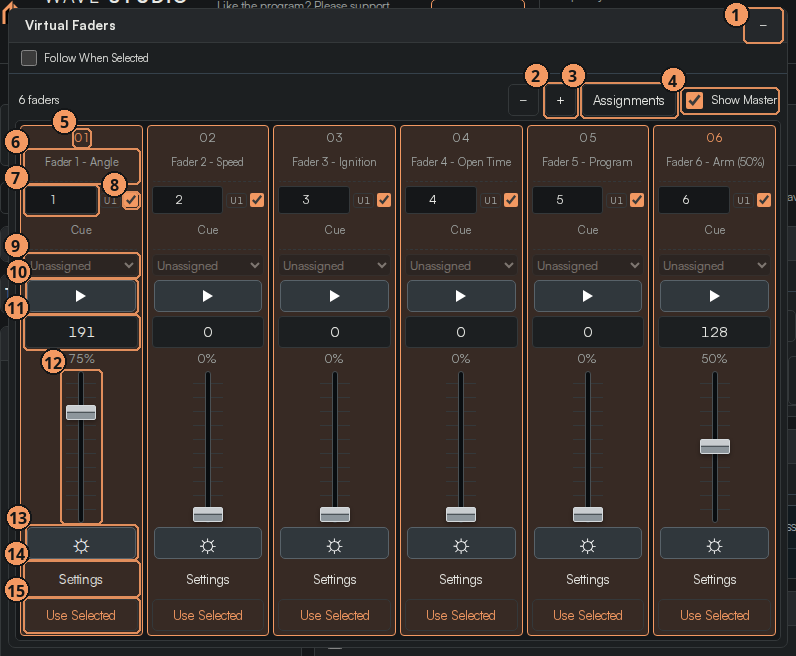
| # | Callout | What it does |
|---|---|---|
| 1 | − | Fewer faders. |
| 2 | + | More faders, up to 20. |
| 3 | Assignments | Shows or hides the patch rows (DMX channel, universe, priority, cue assignment). |
| 4 | Show Master | Show the Bank Master strip in this panel. |
| 5 | Fader number | 01–20. |
| 6 | Label | Click to rename. Shipped: Fader 1 Angle, 2 Speed, 3 Ignition, 4 Open Time, 5 Program, 6 Arm (50%). |
| 7 | DMX channel | The address this fader writes to in the virtual universe (U1). Faders 1–6 ship on channels 1–6, i.e. the first unit's footprint. |
| 8 | DMX priority | When ticked, this fader's output takes over the matching fixture patch from preset playback. |
| 9 | Cue assignment | Unassigned, Multi-unit chase, or any recorded cue — turns the fader into a cue playback. |
| 10 | Play flash ▶ (hold) | Fires the assigned cue while held. |
| 11 | Value 0–255 | Type a DMX value directly. |
| 12 | Fader | Drag, or hover and use the mouse wheel (step size in Settings). |
| 13 | Intensity flash ☼ (hold) | Jumps the fader to the flash level while held. |
| 14 | Settings | Per-fader defaults and patch (next image). |
| 15 | Use Selected | Captures the units currently selected on stage as this fader's targets. |
| Script (speak) | On screen (do) |
|---|---|
| "Switch the mode bar to Virtual Faders. The status reads 'Local fader playback · no hardware output' — same promise as always." | Click Virtual Faders. |
| "Open the Virtual Faders panel and press Assignments 3 so you can see the whole strip. Six faders by default; plus 2 gives you up to twenty. Read the labels 6: Angle, Speed, Ignition, Open Time, Program, Arm. That is the X2's entire DMX footprint — six channels — and each fader is patched 7 to one of them. In other words, from this panel you can do everything the unit does." | Click Assignments. Hover each label. |
| "A fader is a fader: drag it 12, roll the wheel over it, or type a value 11 from zero to two-fifty-five. The percentage underneath is the same number as a percentage." | Drag Fader 1 to 75%, type 128 in the value box, back to 191. |
4.2 Taking control of a unit
| Script | On screen |
|---|---|
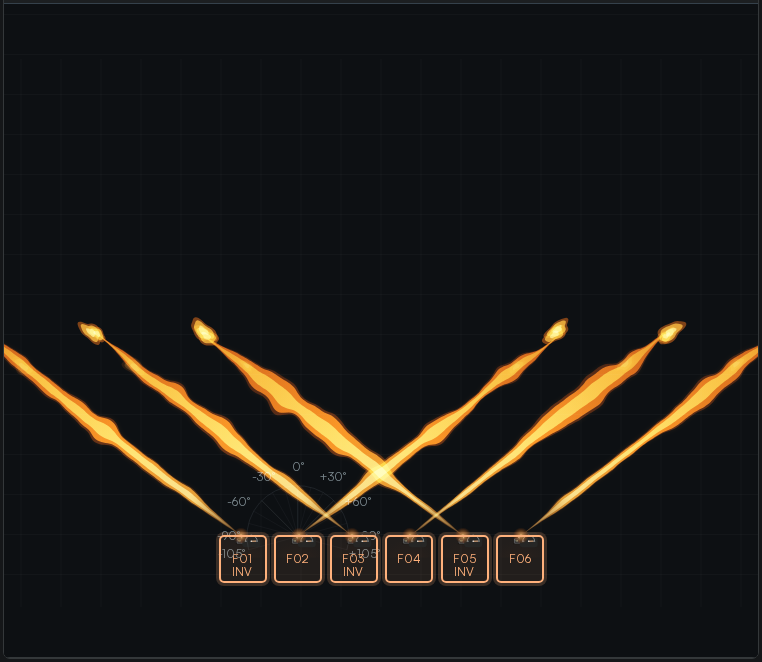
| "Let's drive a unit from scratch. In Bank & Mapping Controls tick Fader playback — that hands the stage to the faders. The Record targets field says which units the faders speak to — F01 to F06 by default. If you want one unit only, select it on stage and press Use Selected 15 on the faders you care about." | Tick Fader playback. Select F02 on stage, press Use Selected on faders 1, 3, 4 and 6; then press Use Selected again with all six selected so the demo stays wide. |
| "Fader 6, Arm. The X2 only fires when channel six sits between fifty and two hundred — the fader ships at fifty percent, value one-two-eight, which is inside that window. Pull it to zero and the units go safe; the Virtual Armed State panel on the right changes with it." | Drag Fader 6 to 0, point at Virtual Armed State, back to 50%. |
| "Fader 1, Angle. One-two-eight is straight up. Seventy-five percent leans to the plus side; zero is all the way to minus one-oh-five. Inverted units mirror, exactly as they would on the truss. Fader 2, Speed, sets how fast the head travels to the new angle." | Sweep Fader 1 from 0 to 100 and back to 75%. Raise Fader 2 to 100, sweep angle again. |
| "Fader 4, Open Time, is how long the valve stays open for a direct flame — sixty percent is about a second and a half. Then Fader 3, Ignition: the unit fires on the rising edge, so push it to full… and there is your flame at the fader angle on every target unit. Pull it down and push again to fire again; if you leave it at the top nothing happens — the DMX monitor will say 'Return CH3 below 254 to trigger'." | Set Fader 4 to 60%. Push Fader 3 to 100% — flames. Pull to 0, push again. |
| "Fader 5, Program, selects an internal sequence by value — three to two-twenty-six covers sequences one to eighty-eight — and the ignition edge then plays that sequence instead of a direct flame. Sequence Information shows which one you landed on." | Raise Fader 5 until Sequence Information reads 051; fire Fader 3. |
4.3 Settings, flash keys and cue faders
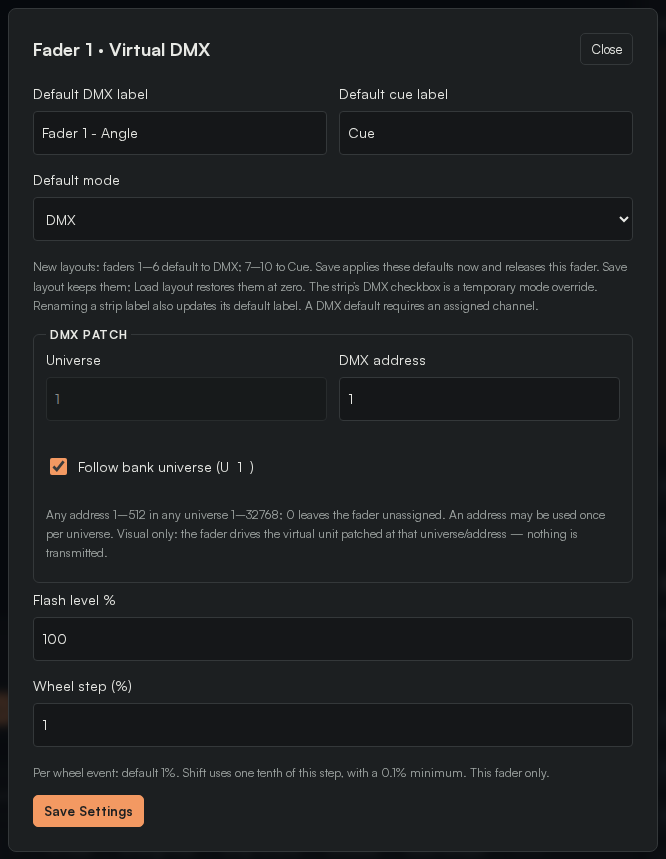
Settings fields: Default DMX label, Default cue label, Default mode (DMX or Cue), Universe and DMX address (with Follow bank universe), Flash level %, Wheel step %, and the fader's Loop option.
| Script | On screen |
|---|---|
| "Each fader has Settings 14: its default label, whether a new fader is DMX or Cue, the universe and start address it writes to, the flash level and the wheel step. Faders one to six ship in DMX mode; seven to ten ship in Cue mode." | Open Settings on Fader 1, show the fields, Close. |
| "The sun button 13 is an intensity flash: hold it and the fader jumps to the flash level, release and it drops back. Perfect for a one-shot ignition — hold ☼ on Fader 3 and you get a clean rising edge every time." | Hold ☼ on Fader 3 twice. |
| "Now the other personality. Set Cue assignment 9 on a fader to one of your recorded cues from Part 3 — or to Multi-unit chase. The fader is now a playback: raise it and the cue runs at that level; hold the play flash 10 and it runs while you hold. In Timing / Delay a cue's Target fader is this same idea from the cue's side." | Click + to add Fader 7. Set its Cue assignment to Opening looks. Raise it; hold ▶. |
4.4 Bank controls, Master and Macros
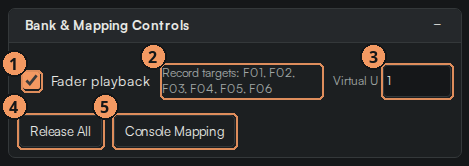
| # | Callout | What it does |
|---|---|---|
| 1 | Fader playback | Master on/off for the virtual bank. |
| 2 | Record targets | Units the faders address by default. |
| 3 | Virtual universe | Which universe the bank writes into (matches DMX Patch). |
| 4 | Release all | Drops every fader and releases the units. |
| 5 | Console mapping | Map a real console's sACN channels to these faders (Part 5). |
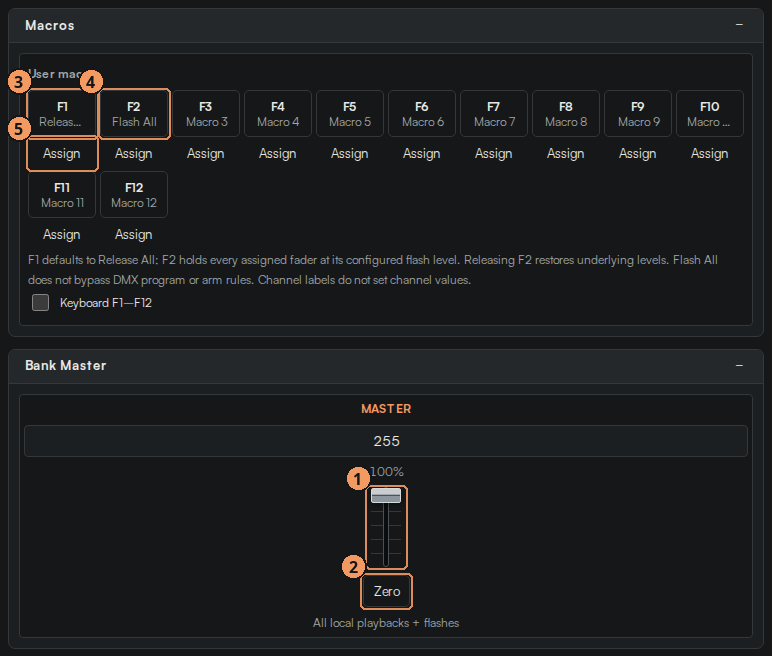
| # | Callout | What it does |
|---|---|---|
| 1 | Bank Master | Scales every fader; 100% by default. |
| 2 | Zero | Master to 0. |
| 3 | F1 Release All | Macro: release everything. |
| 4 | F2 Flash All | Macro: flash every fader to its flash level while held. |
| 5 | Assign a macro | F3–F12 are yours to assign. |
| Script | On screen |
|---|---|
| "Bank & Mapping Controls is the bank's switchboard: Fader playback 1, the default Record targets 2, the Virtual universe 3, Release all 4, and Console mapping 5, which we use in Part 5 to put a Vista fader on top of these." | Hover each. Click Release all. |
| "Bank Master scales the whole bank — pull it down and every fader's effective value follows; Zero kills it. Macros gives you F1 Release All and F2 Flash All, with F3 to F12 free to assign." | Drag Bank Master to 50%, watch the values, back to 100%. Press F2 Flash All and hold. |
4.5 Rear panel, armed state, direction and the DMX monitor
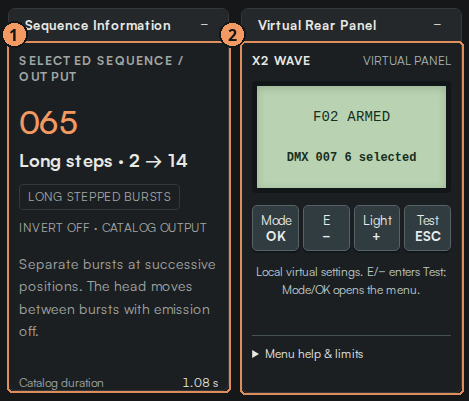
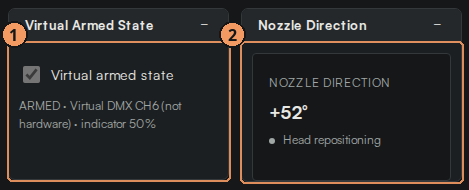
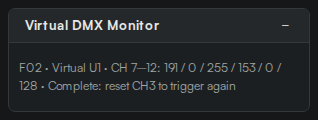
| Script | On screen |
|---|---|
| "Three panels on the right confirm what the faders are doing, in the unit's own language. Virtual Rear Panel 2 is the display on the back of an X2 — 'F02 ARMED DMX 007' — with the Mode/OK, E/−, Light/+ and Test/ESC keys drawn as they are on the unit, so you can show a tech what they will see at the truss. Sequence Information 1 tells you the program the unit is running." | Select F02; point at the rear panel text. |
| "Virtual Armed State mirrors channel six, and Nozzle Direction shows the head's current tilt for the selected unit — tick Follow When Selected so it tracks whichever unit you click." | Drag Fader 6 down and up; click F01 then F05 with Follow on. |
| "Finally the Virtual DMX Monitor. It is the frame the faders are producing: every channel, every value. Tick a channel to take over the matching fixture patch, leave it unticked and that unit stays with cue playback — so you can fader-drive two units while the other four run the stack. It also prints the engine's reason when something does not fire." | Open Virtual DMX Monitor. Fire Fader 3; read the status line. |
| "That is the whole unit under your hands. Next, we hand those faders to a real console." | — |
Recap
- Six faders = six X2 channels: Angle, Speed, Ignition, Open Time, Program, Arm.
- Arm must be 50–200; Ignition fires on a rising edge (drop below 254 to re-fire); Program 3–226 picks sequences 001–088.
- Fader playback on, Use Selected to aim faders at units, DMX priority to take a patch over.
- Faders can also be cue playbacks (Cue assignment, ▶ flash); ☼ is the intensity flash; Settings hold labels, patch, flash level and wheel step.
- Bank Master, Release all, Macros F1/F2; Rear Panel, Armed State, Nozzle Direction and the DMX Monitor confirm everything.
Two-minute practice
- Aim faders 1, 3, 4 and 6 at F03 only. Tilt it to −45°, arm it, fire a 1 s direct flame twice.
- Put Opening looks on Fader 8 and run it at 60% while F03 sits armed and tilted.
- Pull Bank Master to zero mid-cue, then Release all.